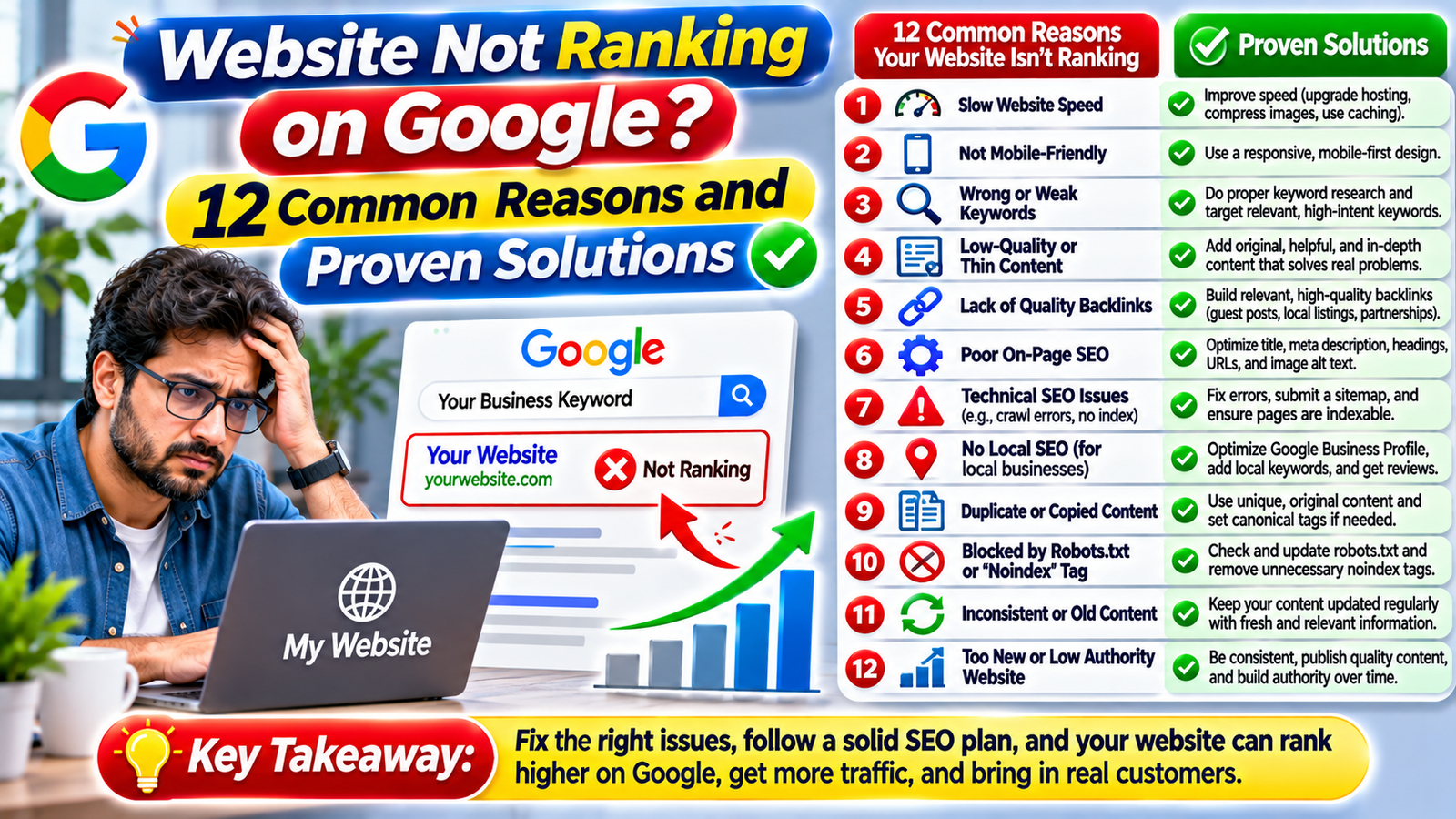
Have you created a website, published content, and invested time in SEO but still cannot find your pages on Google? You are not alone. Many website owners face this frustrating problem, especially when their websites receive very little organic traffic despite regular updates.
A website needs more than attractive design and well-written content to perform well in search engines. Google must be able to discover, crawl, understand, and index your pages before they can appear in relevant search results.
If your website is not ranking on Google, there may be several reasons behind the problem. These can include technical SEO errors, poor keyword targeting, low-quality content, indexing issues, slow loading speeds, or strong competition.
In this guide, we will explore twelve common reasons why websites struggle to rank and explain practical solutions you can use to improve your search visibility.
Why Is My Website Not Ranking on Google?
There is no single reason why a website may fail to rank. Search engine performance depends on several factors, including technical accessibility, content relevance, website quality, competition, and search intent.
Before making major changes, identify whether your pages are:
- Not discovered by Google.
- Discovered but not crawled.
- Crawled but not indexed.
- Indexed but not ranking for target keywords.
- Ranking but receiving very few clicks.
Understanding the difference helps you choose the right solution instead of making unnecessary changes.
12 Reasons Your Website Is Not Ranking on Google
Here are twelve common problems that may prevent your website from achieving better organic visibility.
1. Your Website Is Not Indexed by Google
One of the first things to check is whether Google has indexed your website pages.
Indexing means Google has processed a page and considered it for inclusion in its search index. If a page is not indexed, it generally cannot appear in normal organic search results.
How to fix it:
- Open Google Search Console.
- Select your website property.
- Use the URL Inspection tool.
- Enter the URL of the affected page.
- Check its indexing status.
- Review any reported problems.
- Request indexing when the page is eligible.
You can also use the search operator site:yourdomain.com as a quick check, although it is not a complete or definitive indexing report.
2. Your Website Has Technical SEO Problems
Technical SEO helps search engines access and understand your website.
If your website contains crawling errors, broken links, incorrect redirects, or server problems, Google may struggle to process important pages.
Common technical issues include:
- Broken internal links.
- Incorrect redirect settings.
- Server errors.
- Missing XML sitemap.
- Incorrect canonical tags.
- Blocked resources.
- Poor website structure.
How to fix it:
Run a technical SEO audit and review the reports in Google Search Console. Fix critical errors first, check important URLs, and make sure Google can access the content you want indexed.
3. You Are Targeting the Wrong Keywords
Keyword selection plays an important role in SEO success.
For example, a small web design company may target a broad keyword such as “website design”. However, competing against established national brands may be difficult.
More specific keywords such as “WordPress website design for small businesses” may better match the company’s services and audience.
How to fix it:
- Research keywords related to your services.
- Understand what users expect from each search.
- Check keyword competition.
- Target relevant long-tail keywords.
- Match each important keyword to an appropriate page.
Use Google Keyword Planner, Google Search Console, and other SEO tools to identify useful opportunities.
4. Your Content Does Not Match Search Intent
Search intent refers to the reason behind a user’s search.
Someone searching for “what is technical SEO” probably wants an explanation, while someone searching for “technical SEO services UK” may be looking for a provider.
If your page does not satisfy the searcher’s expectations, it may struggle to perform well.
How to fix it:
Before writing or updating a page, review the search results for your target keyword. Understand whether users expect a guide, product page, service page, comparison, or tutorial.
Then structure your content around that purpose.
5. Your Website Content Is Too Thin
Short pages are not automatically bad, and long articles are not automatically better. However, content that provides very little useful information may struggle to compete with more helpful pages.
For example, a service page containing only a short introduction and a contact button may not explain enough about the service.
How to fix it:
Create content that answers real customer questions.
Include:
- Clear service descriptions.
- Important benefits.
- Practical examples.
- Relevant FAQs.
- Useful images where appropriate.
- Clear calls to action.
Focus on usefulness and accuracy rather than writing extra words just to increase article length.
6. Your Website Is Too Slow
Website speed affects the user experience. Visitors may leave when pages take too long to load, especially on mobile devices.
Large images, unnecessary plugins, poor hosting, and excessive scripts can affect performance.
How to fix it:
- Compress large images.
- Use modern image formats such as WebP.
- Enable suitable caching.
- Remove unnecessary plugins.
- Choose reliable hosting.
- Reduce unnecessary scripts.
- Review Core Web Vitals.
Use Google PageSpeed Insights to identify performance opportunities.
7. Your Website Is Not Mobile-Friendly
Many people use smartphones to search for information, products, and services.
If your website is difficult to navigate on a mobile screen, visitors may have a poor experience.
Common mobile problems include:
- Text that is too small.
- Buttons that are difficult to tap.
- Content wider than the screen.
- Poorly displayed images.
- Complicated navigation.
- Slow mobile loading.
How to fix it:
Use a responsive website design and test important pages on different screen sizes. Make sure text, menus, images, and forms work properly on mobile devices.
8. Your Website Has Weak Internal Linking
Internal links connect one page of your website to another.
They help visitors discover related information and provide search engines with additional context about your website structure.
For example, a blog article about local SEO can link to your local SEO service page.
How to fix it:
- Link related articles together.
- Link informational content to relevant service pages.
- Use descriptive anchor text.
- Make important pages easy to reach.
- Avoid broken or irrelevant internal links.
A logical internal linking structure can improve navigation and help search engines discover important content.
9. Your Website Has Few Relevant Backlinks
Backlinks are links from other websites pointing to your website.
Relevant, trustworthy backlinks can support your website’s authority and help search engines understand its wider online reputation.
However, buying large quantities of low-quality backlinks can create risks.
How to fix it:
- Publish useful and original resources.
- Build relationships with relevant businesses.
- Contribute expert articles to suitable websites.
- Participate in genuine industry communities.
- Seek legitimate local business opportunities.
Focus on relevance and quality instead of chasing a high backlink count.
10. Your Website Faces Strong Competition
Some keywords are extremely competitive. Established websites may have stronger content, better brand recognition, more relevant backlinks, and greater authority.
A new website may struggle to compete immediately.
How to fix it:
Start with more specific keyword opportunities.
For example:
| Broad Keyword | More Specific Keyword |
|---|---|
| SEO | SEO services for small businesses |
| Web Design | WordPress web design in Luton |
| Digital Marketing | Digital marketing for local businesses |
| PPC | Google Ads management for small businesses |
| Website Development | Affordable business website development |
Build useful content around relevant topics and gradually expand your keyword targets.
11. Your Website Has Duplicate Content
Duplicate or very similar pages can make it difficult for search engines to understand which version should be treated as the main page.
This can happen when websites create multiple URLs with similar content or publish several articles targeting almost identical topics.
How to fix it:
- Review similar website pages.
- Use appropriate canonical tags.
- Consolidate overlapping content where necessary.
- Redirect outdated pages when appropriate.
- Create unique and useful content for each important page.
Do not automatically delete every page with similar information. Review its purpose, traffic, backlinks, and indexing status first.
12. You Are Not Monitoring SEO Performance
SEO without performance monitoring makes it difficult to identify what is working.
You may be publishing articles regularly without knowing whether Google is discovering them or whether visitors are finding your website through relevant searches.
How to fix it:
Use these tools:
Google Search Console: Monitor impressions, clicks, search queries, indexing, and technical reports.
Google Analytics 4: Understand website traffic, engagement, and conversions.
Google PageSpeed Insights: Identify website speed and performance issues.
Rank Math SEO: Review on-page SEO elements, titles, meta descriptions, and focus keywords within WordPress.
Check your performance regularly and use the information to improve important pages.
How to Check Why Your Website Is Not Ranking on Google
Instead of changing everything at once, follow this practical troubleshooting process.
| Step | What to Check | Recommended Tool |
|---|---|---|
| 1 | Whether important pages are indexed | Google Search Console |
| 2 | Crawling and indexing errors | Search Console |
| 3 | Keyword impressions and clicks | Search Console |
| 4 | Website loading performance | PageSpeed Insights |
| 5 | Mobile usability and layout | Mobile browser testing |
| 6 | Search intent and competition | Google Search |
| 7 | Website traffic and conversions | Google Analytics 4 |
| 8 | Titles and meta descriptions | Rank Math |
This process helps you identify the actual problem before spending money on unnecessary SEO services.
How Long Does It Take for a Website to Rank on Google?
There is no fixed timeline for achieving Google rankings.
A new website may need time to establish its online presence, while an established website may improve faster after resolving specific technical or content issues.
Several factors influence the timeline:
- Website age and history.
- Content quality and relevance.
- Competition for target keywords.
- Technical SEO condition.
- Website reputation and backlinks.
- Frequency and quality of improvements.
Google’s SEO guidance explains that SEO changes can take time to produce noticeable effects. Therefore, focus on consistent improvement rather than expecting immediate rankings.
Why Is My WordPress Website Not Ranking on Google?
WordPress websites can experience many of the same SEO problems as other websites.
However, certain WordPress-specific issues are worth checking.
1. Check Search Engine Visibility Settings
In WordPress, visit Settings and then Reading. Check whether the option discouraging search engines from indexing the site is enabled.
Make sure this setting reflects your intended visibility.
2. Review Rank Math Settings
If you use Rank Math, check:
- SEO titles.
- Meta descriptions.
- Focus keywords.
- Canonical URLs.
- XML sitemap settings.
- Robots meta settings.
- Schema configuration.
Make sure important pages are not accidentally set to noindex.
3. Review Your Sitemap
Check that your XML sitemap is accessible and includes the important pages you want Google to discover.
You can submit the sitemap through Google Search Console.
4. Check Your Plugins and Theme
Unnecessary plugins, outdated themes, and poorly configured features may affect website speed or functionality.
Keep your WordPress installation updated and remove plugins you no longer need.
A Simple 30-Day SEO Recovery Plan
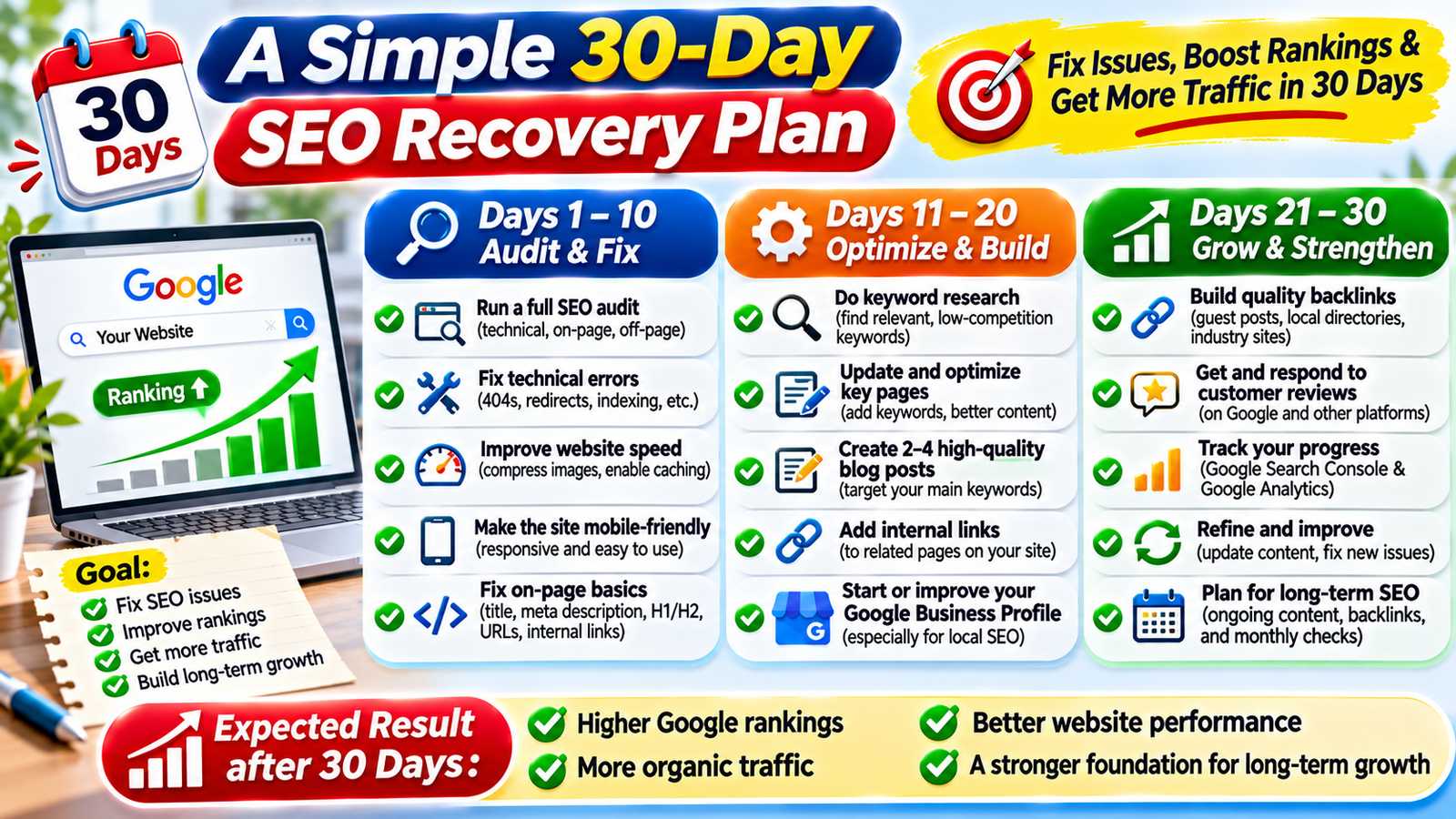
If your website is not performing as expected, use this plan to organise your improvements.
| Period | Main Activities |
|---|---|
| Days 1–7 | Check indexing, Search Console reports, robots settings, and sitemap |
| Days 8–14 | Research keywords, review search intent, improve titles and content |
| Days 15–21 | Fix technical issues, improve speed, mobile experience, and internal links |
| Days 22–30 | Improve relevant pages, review backlinks, and measure performance |
This is a starting plan, not a guaranteed ranking timeline. Prioritise serious indexing and technical problems before making minor content changes.
When Should You Hire an SEO Expert?
Some SEO problems can be resolved independently. However, professional support may be useful when:
- Important pages are not being indexed.
- Organic traffic has dropped significantly.
- Your website has complicated technical problems.
- Your business faces strong keyword competition.
- You need a structured SEO strategy.
- You cannot identify the reason behind poor performance.
A reliable SEO professional should explain the problems, recommended actions, expected deliverables, and how progress will be measured.
Avoid providers that promise guaranteed rankings or instant first-page results.
Frequently Asked Questions (FAQs)
1. Why Is My Website Not Ranking on Google?
If your website is not ranking on Google, the problem may be related to indexing, technical SEO, keyword targeting, content quality, or strong competition. Identifying the actual issue is the first step towards improving your Google rankings.
2. How Can I Fix My Website Not Ranking on Google?
If your website is not ranking on Google, start by checking Google Search Console, reviewing indexing errors, improving website content, fixing technical SEO problems, and targeting relevant keywords.
3. Why Is My New Website Not Ranking on Google?
A new website not ranking on Google may simply need more time to be discovered, crawled, and indexed. Make sure your website has useful content, an XML sitemap, and no unnecessary indexing restrictions.
4. Why Is My WordPress Website Not Ranking on Google?
A WordPress website not ranking on Google may have incorrect visibility settings, noindex tags, technical errors, slow loading speed, or poorly optimised content. Review your WordPress and Rank Math settings carefully.
5. Can Poor SEO Cause a Website Not Ranking on Google?
Yes. Weak keyword research, poor content quality, technical SEO problems, and incorrect search intent targeting can contribute to a website not ranking on Google.
6. How Do I Check If My Website Is Not Ranking on Google Because of Indexing?
If your website is not ranking on Google, use the URL Inspection tool in Google Search Console. It helps you check whether Google has discovered, crawled, and indexed an individual page.
7. Why Is My Website Not Ranking on Google Even With Good Content?
A website not ranking on Google despite good content may face strong competition, weak keyword targeting, indexing problems, or a mismatch between content and search intent.
8. Does Website Speed Affect a Website Not Ranking on Google?
Website speed can affect user experience and contribute to page experience signals. If your website is not ranking on Google, review its loading performance and Core Web Vitals using PageSpeed Insights.
9. Can Missing Backlinks Cause a Website Not Ranking on Google?
A lack of relevant backlinks may make it harder to compete in some search results. However, a website not ranking on Google can have several causes, so review technical SEO and content quality as well.
10. How Long Does It Take to Fix a Website Not Ranking on Google?
Fixing a website not ranking on Google depends on the underlying problem. Technical corrections may be implemented quickly, while improvements in organic rankings can take considerably longer.
11. Why Is My Website Indexed but Not Ranking on Google?
A website indexed but not ranking on Google may have insufficient relevance, weak content, strong competition, or poor alignment with search intent. Indexing does not guarantee search rankings.
12. Can Keyword Research Fix a Website Not Ranking on Google?
Keyword research can help address a website not ranking on Google by identifying relevant search terms, customer needs, and realistic opportunities. Target keywords that match your actual services and content.
13. Does Duplicate Content Cause a Website Not Ranking on Google?
Duplicate or very similar pages can create indexing and canonicalisation problems. If your website is not ranking on Google, review overlapping pages and ensure that preferred URLs are clearly identified.
14. Can Mobile-Friendly Design Help a Website Not Ranking on Google?
Yes. Mobile-friendly design supports a better user experience and helps Google access the mobile version of your content. Check your website’s mobile layout if your website is not ranking on Google.
15. Why Is My Website Not Ranking on Google After Publishing New Articles?
A website not ranking on Google after publishing new articles may have pages that are not indexed, target highly competitive keywords, or fail to satisfy search intent. Check each article through Google Search Console.
16. Can Rank Math Fix My Website Not Ranking on Google?
Rank Math can help identify on-page SEO issues, manage metadata, configure sitemaps, and review indexing settings. However, Rank Math alone cannot guarantee a solution when your website is not ranking on Google.
17. Does Internal Linking Help a Website Not Ranking on Google?
Internal linking can help search engines discover related pages and understand your website structure. If your website is not ranking on Google, review whether important pages have relevant internal links.
18. Why Is My Website Not Ranking on Google for My Target Keyword?
Your website may not rank for a target keyword because of high competition, incorrect search intent, weak relevance, or insufficient content. Compare your page with the search results before making improvements.
19. Can Technical SEO Fix a Website Not Ranking on Google?
Technical SEO can resolve problems involving crawling, indexing, redirects, canonical tags, site structure, and website performance. These improvements may help address a website not ranking on Google.
20. How Can Google Search Console Help With a Website Not Ranking on Google?
Google Search Console helps investigate a website not ranking on Google by showing indexing information, search queries, impressions, clicks, and technical reports.
21. Should I Rewrite Content if My Website Is Not Ranking on Google?
Not always. First identify why your website is not ranking on Google. Update content when it is outdated, incomplete, inaccurate, or does not satisfy the searcher’s needs.
22. Can Strong Competitors Cause My Website Not Ranking on Google?
Yes. Established competitors may have more relevant content, stronger online reputations, and better backlinks. If your website is not ranking on Google, target realistic keyword opportunities and improve your content.
23. Why Is My Website Not Ranking on Google Maps?
If your business is not appearing on Google Maps, review your Google Business Profile eligibility, verification status, categories, business information, relevance, distance, and prominence.
24. Should I Hire an SEO Expert if My Website Is Not Ranking on Google?
If your website is not ranking on Google and you cannot identify the problem, an experienced SEO professional can audit your website, investigate technical issues, and recommend a suitable optimisation strategy.
25. What Should I Do First When My Website Is Not Ranking on Google?
When your website is not ranking on Google, start with Google Search Console. Check indexing status, review technical errors, examine keyword impressions, and prioritise the pages that matter most to your business.
Conclusion
When your website is not appearing in Google search results, the first step is to identify the actual reason. Improving SEO requires more than adding keywords or publishing more articles.
Focus on indexing, technical accessibility, useful content, search intent, website performance, internal linking, and relevant backlinks.
If your website is not ranking on Google, take a structured approach: diagnose the problem, prioritise important fixes, monitor your results, and continue improving your website.
With consistent and user-focused SEO work, you can build a stronger online presence and improve your opportunities to attract relevant organic traffic.